

This guide will help you set up real-time integrations with our platform using webhooks. Whether you want to send Slack notifications, log events to Google Sheets, or trigger custom systems in real-time, this guide will walk you through it step-by-step.
You can choose between:
- Using our Zapier app for simple no-code automation.
- Connecting your own webhook endpoint to receive specific events directly.
How events work
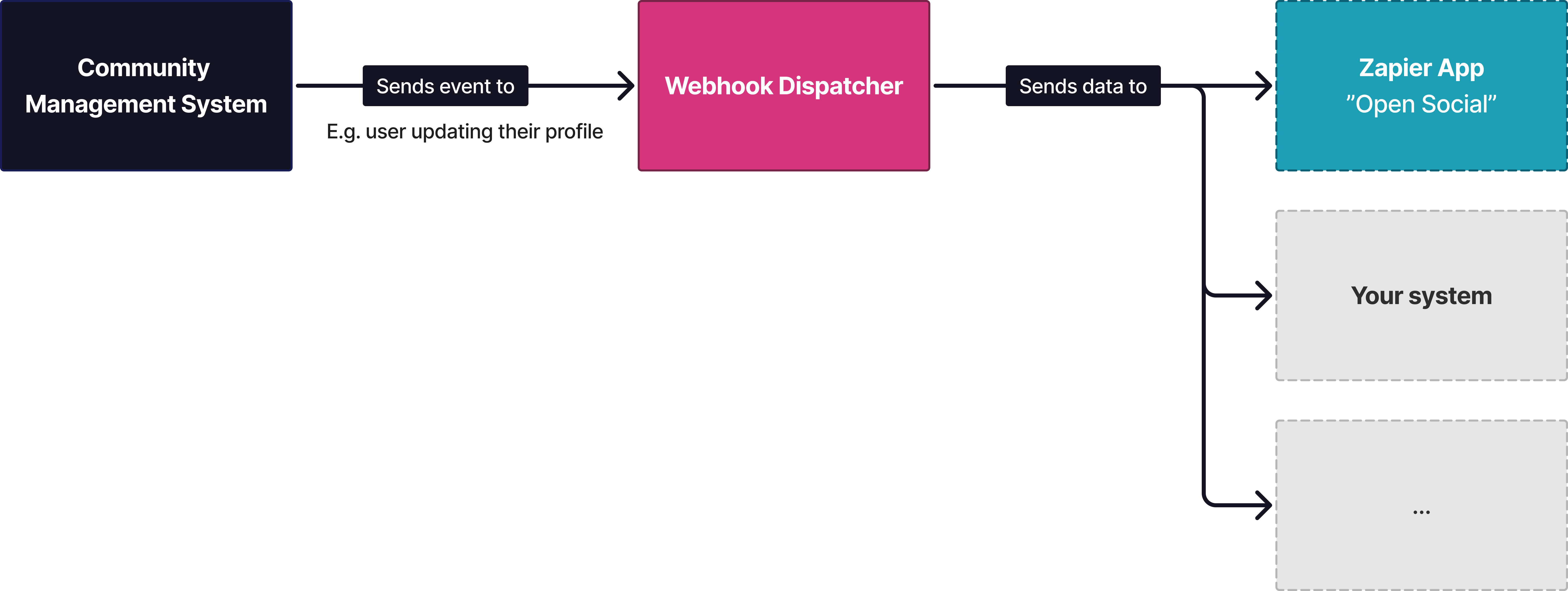
Our platform uses a real-time event system, no polling or manual checks needed. When something important happens, like a user logging in or a group being updated, we’ll send an event notification to your system.
Here’s how it works:
- Open Social Community Management System (Event Producer)
Detects key actions, like a new user or updated profile, and generates an event
- Webhook Dispatcher (Secure Forwarder)
Receives the event and securely forwards it via a signed webhook to your system or Zapier.
- Your system or Zapier (Event Consumer)
Takes action based on the event—like logging it, notifying your team, or triggering a workflow.