
Events Recap
Events are a key component of any community platform, they bring users together, help sharing information and they increase engagement.
But what happens once an event is passed? Every community is free to create their own workflow. Some communities create follow up discussions on the platform, others create documents with notes in specific groups, others send emails to the partecipants.
With Event recap we want to help these processes by providing a centralized place where all information can be found.
How does event recap work?
Once an event is finished, as an Event Manager you might still have some information that you want to share with the enrollees.
Perhaps there are recordings of the event that you have uploaded to youtube or social media, meeting notes and more.
All of these links can now be added directly to the event making it a useful hub that users can still visit and interact with after it ended.
How to add link to the event recap?
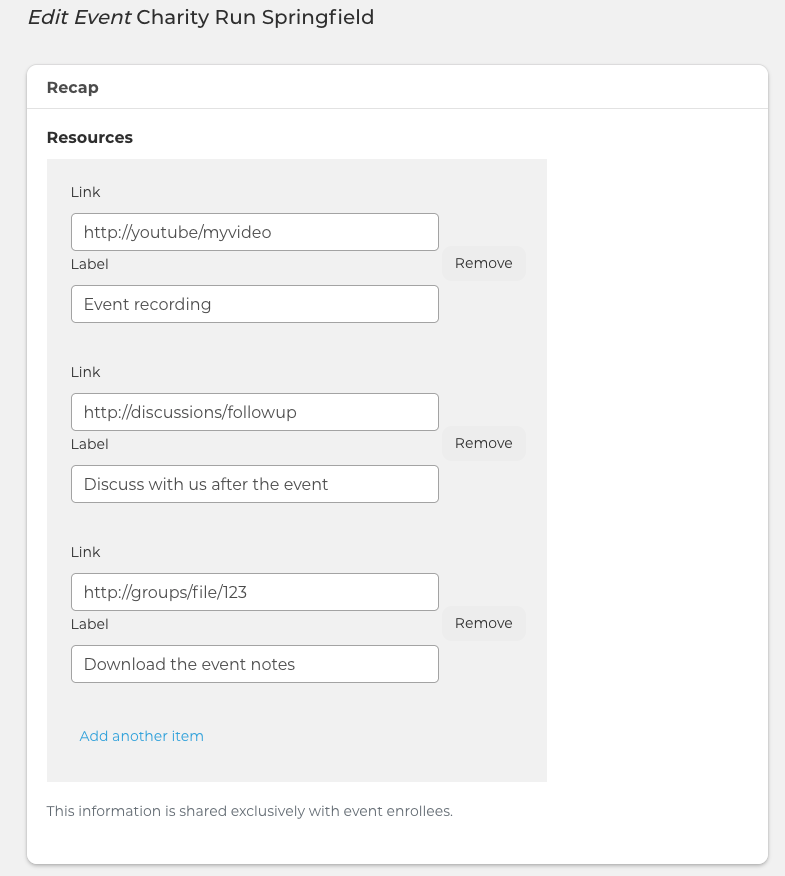
As an Event Manager you can edit any passed event and you will find a new section "Recap" at the top of the page.
Here you can enter any link you want and also specify labels for these links.
Where to see the links?
Once ready, save the event and visit the Details page of your event.
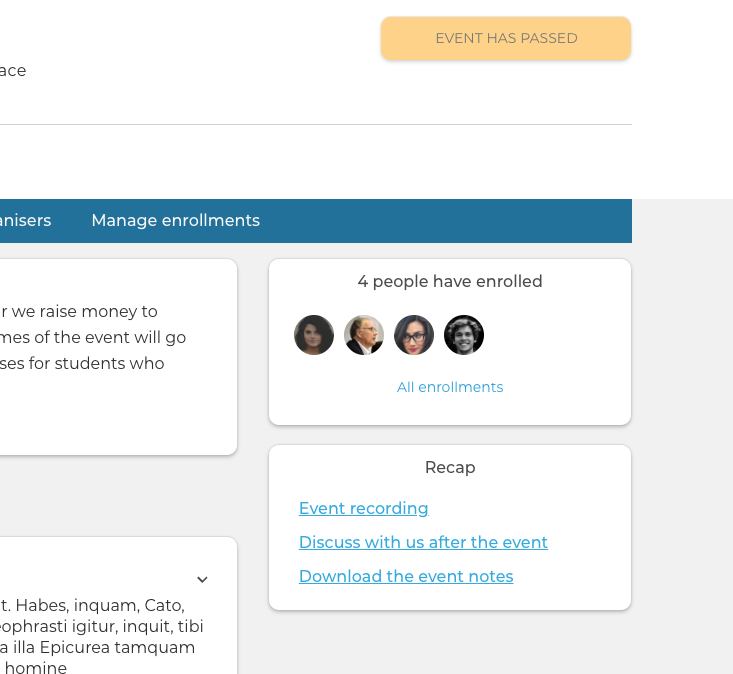
On the right column you will see a new "Recap" block with all the links provided.
It is important to note that the Recap block is visible only for logged in users that have enrolled in the event. This protects any sensitive information that might have been shared in those videos and notes.