

Gaia AI manual›Setting up Gaia AI›Gaia AI spam prevention
This manual explains how Gaia AI Spam Prevention works on the platform, how Site Managers can configure it, and what happens when spam is detected. This page covers what the feature is, how AI scoring works, and the actions you can set up to protect your community.
Note: Gaia AI Spam Prevention is part of Gaia AI. If you do not use it yet, ask your Customer Success Manager for a demo.
What is Gaia AI Spam Prevention?
Spam and low-quality content can hurt community trust and make moderation harder. Traditional spam filters rely on a fixed list of blocked words, but spammers often find ways around them.
Gaia AI Spam Prevention uses artificial intelligence to analyse content as it is created. Every piece of supported content receives a relevancy score from 0 to 100:
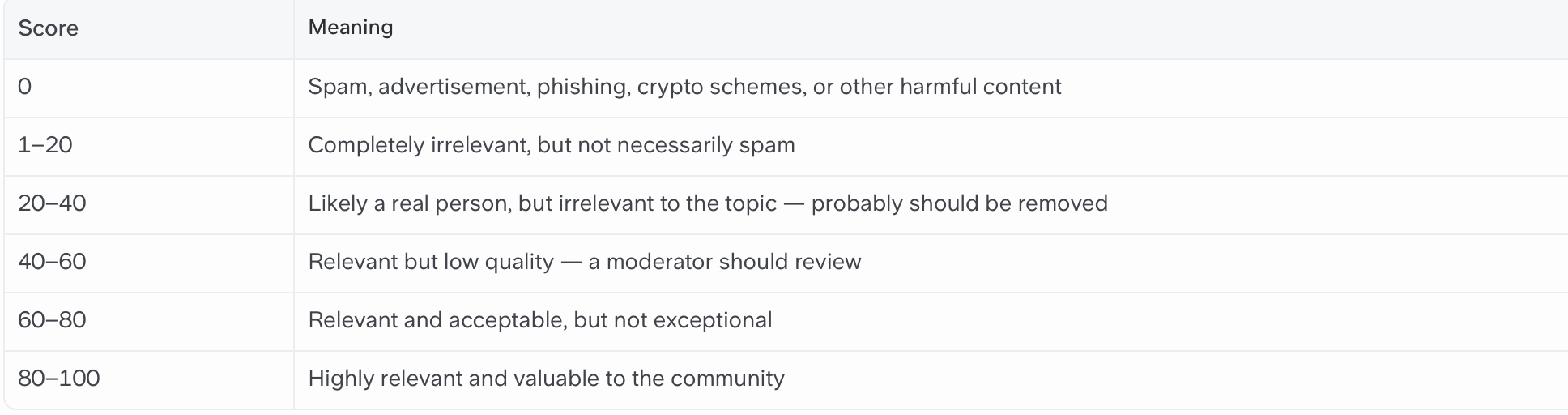
- Higher scores (80–100) mean the content is highly relevant and valuable to your community.
- Lower scores (0–40) indicate content that is irrelevant, low quality, or likely spam.
- A score of 0 means the AI has identified the content as spam. Examples include advertisements, phishing links, crypto schemes, and other harmful content.
Based on these scores, you can configure automatic actions such as unpublishing content, blocking users, or learning new spam words. This helps keep your community safe without constant manual moderation.
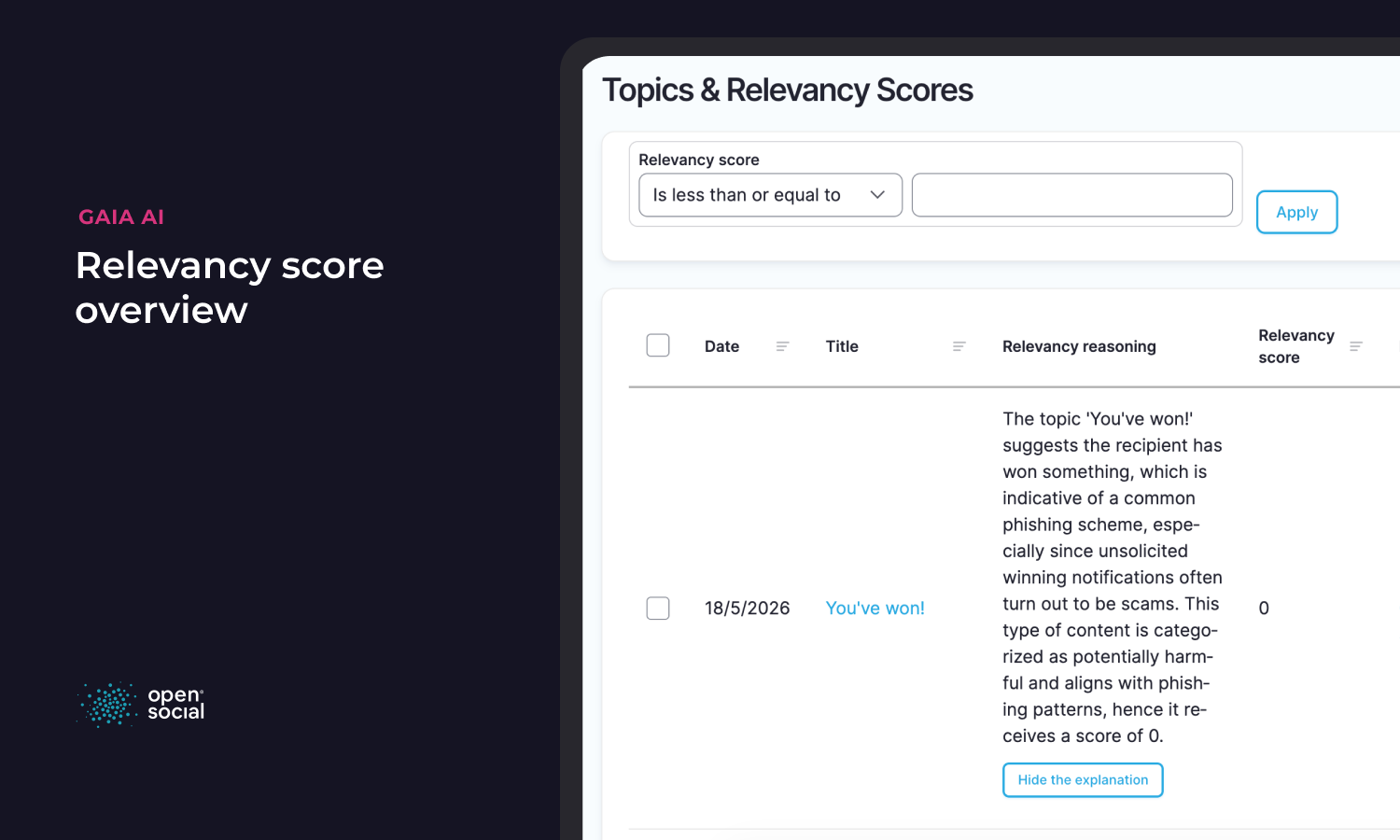
You stay in control. Relevancy scores and AI reasoning help you understand why content was flagged and review how spam prevention is working in your community.
The main use case is for communities that receive a high volume of user-generated content, such as topics, discussions, posts, and comments, and want proactive, intelligent protection rather than reacting to spam after it is already visible.
How does it work?
Gaia AI Spam Prevention builds on two layers of protection:
- AI Relevancy Scoring: When a member creates or edits supported content, AI analyses it and assigns a relevancy score. The AI also provides a short explanation of why it gave that score.
- Automated Actions: If the score falls below the thresholds you configure, one or more automatic actions are triggered.
Configuration for Site Managers
As a Site Manager, you configure Gaia AI Spam Prevention from the Social Dashboard.
Navigate to: Configuration → Gaia Settings → Gaia Spam Prevention
Spam Prevention Actions
On the Gaia Spam Prevention settings page, you will see a table of available actions. For each action you can set:
- Trigger Score: The relevancy score at or below which the action runs. Lower scores mean higher spam risk.
- Enabled: Whether the action is active.
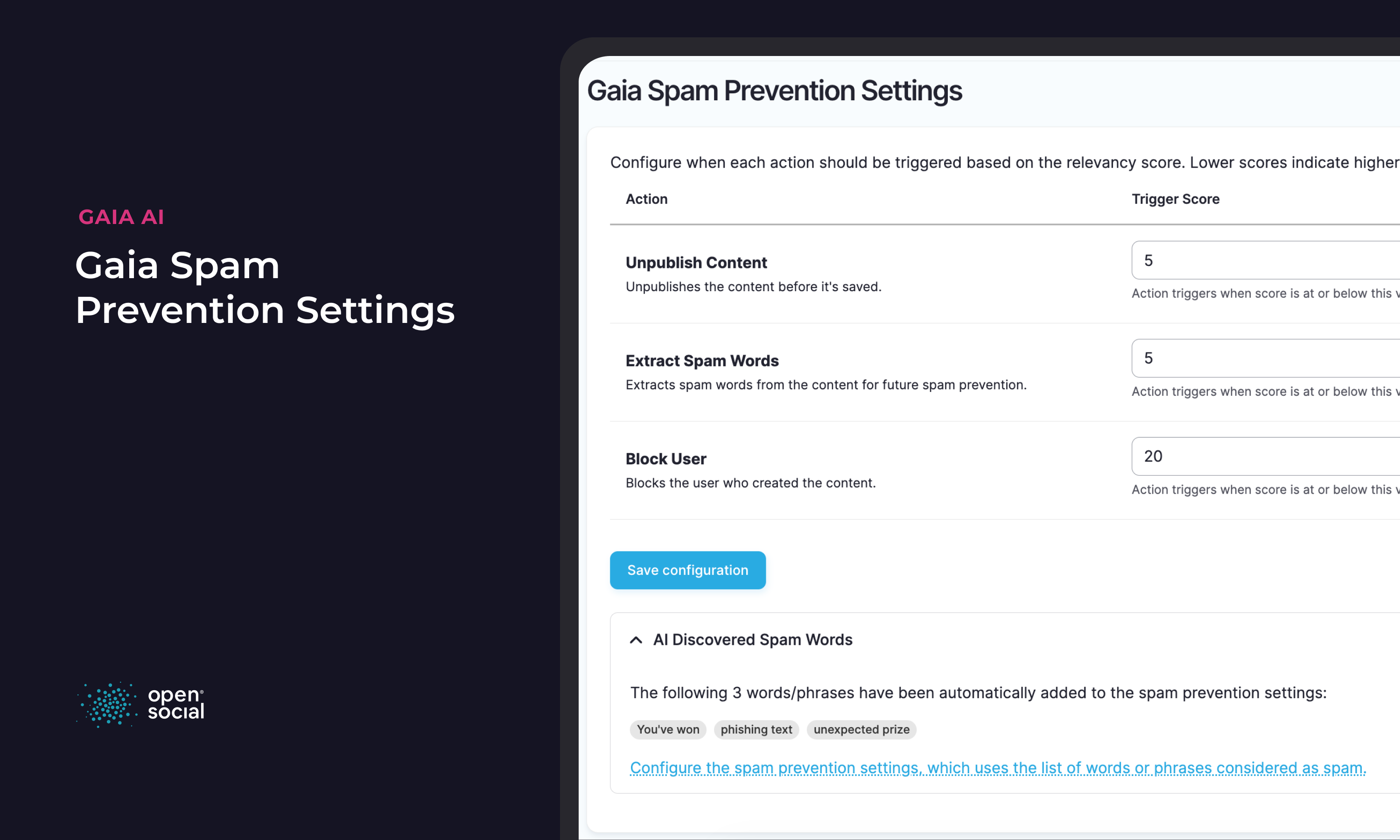
The three available actions are:
1. Unpublish Content
What it does: Automatically unpublishes the content before it is saved, so other community members cannot see it.
Recommended for: Catching low-quality or suspicious content that should not be visible while you review it and can take further action.
2. Block User
What it does: Blocks the user who created the spam content. The user is logged out immediately and can no longer access the platform.
Recommended for: Repeat or clearly malicious spammers. Use with care. A score this low usually indicates serious spam.
3. Extract Spam Words
What it does: Uses AI to identify spam-related words or phrases in the flagged content and automatically adds them to your spam words list. This helps the word-based spam filter catch similar content in the future.
Recommended for: Continuously improving your spam protection without manually maintaining a word list.
Important: Multiple actions can run at the same time. For example, if you enable all three actions with their default scores, content with a score of 5 would trigger all three: the content is unpublished, the user is blocked, and new spam words are extracted.
Tip: Start with Unpublish Content enabled, look at the relevancy scores and take a score at the lower end of the content you've found and monitor results before enabling Block User. Blocking users is a strong action and should be used when you are confident in your score thresholds.
This approach keeps people in the loop while still reducing manual moderation. You can review scores, reasoning, and blocked content before deciding whether stronger automatic actions are appropriate for your community.
AI Discovered Spam Words
When the Extract Spam Words action is enabled, the system automatically learns from flagged content. On the Gaia Spam Prevention settings page, expand the AI Discovered Spam Words section to see words and phrases the AI has identified.
These words are also added to your main spam words list, as described below, so the traditional word-based filter can block them immediately on future submissions.
Spam Prevention Settings (Word-Based Filter)
Gaia AI Spam Prevention works alongside the existing Spam Prevention Settings, which use a list of blocked words and phrases.
Navigate to: People → Spam prevention settings
Or click on the Link "Configure the spam prevention settings, which uses the list of words or phrases considered as spam." from the Gaia AI Spam Prevention page.
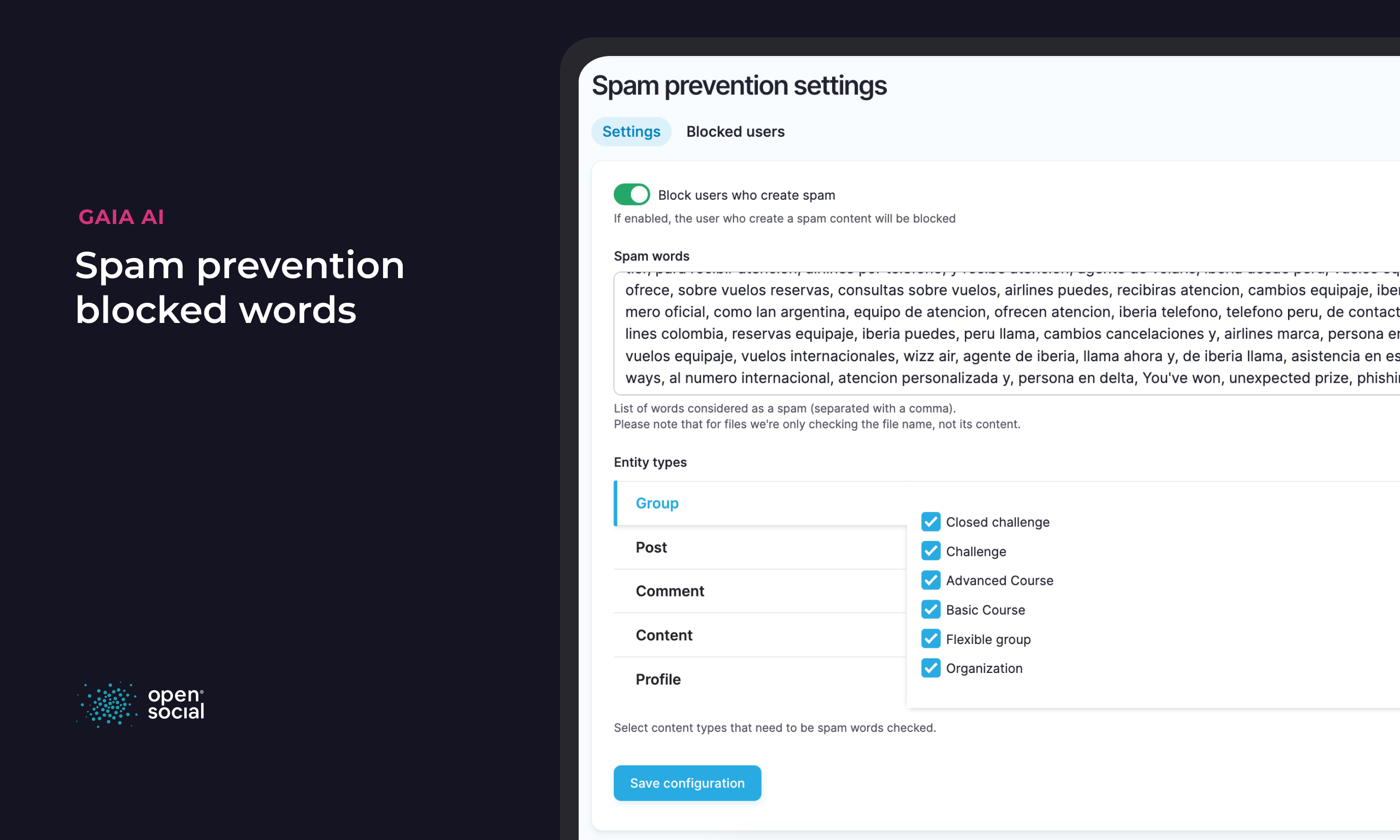
Block users who create spam
When enabled, any user who submits content containing a blocked spam word is automatically blocked from the platform.
Spam words
Enter words or phrases considered spam, separated by commas. When a member tries to create or edit content containing these words, the submission is blocked and they see an error message. With Gaia AI this will get populated by AI, but you can always add or remove words from this list.
Entity types
Choose which content types should be checked against the spam words list. You can enable checking per content type, for example Topics, Discussions, Posts, Comments, Groups, and Profiles.
Managing Blocked Users
You can review blocked users from the Spam Prevention Settings page. Click the Blocked users tab to see a filtered list of all blocked users on your platform.
From there, you can review blocked accounts and unblock users if needed. This gives Site Managers a way to review automatic decisions and correct them when necessary.
Understanding Relevancy Scores
The AI assigns scores using these general guidelines:
Site Managers and moderators with the right permissions can view relevancy scores and the AI's reasoning on individual pieces of content. This helps you fine-tune your trigger scores over time.
This keeps Site Managers and moderators in the loop, even when actions happen automatically. You can see why the AI assigned a score, review the outcome, and adjust your configuration when needed.
You can also review content relevancy scores in bulk from the Gaia Settings area, where overview pages are available for Topics, Discussions, Posts, and Comments.
Community Purpose Definition
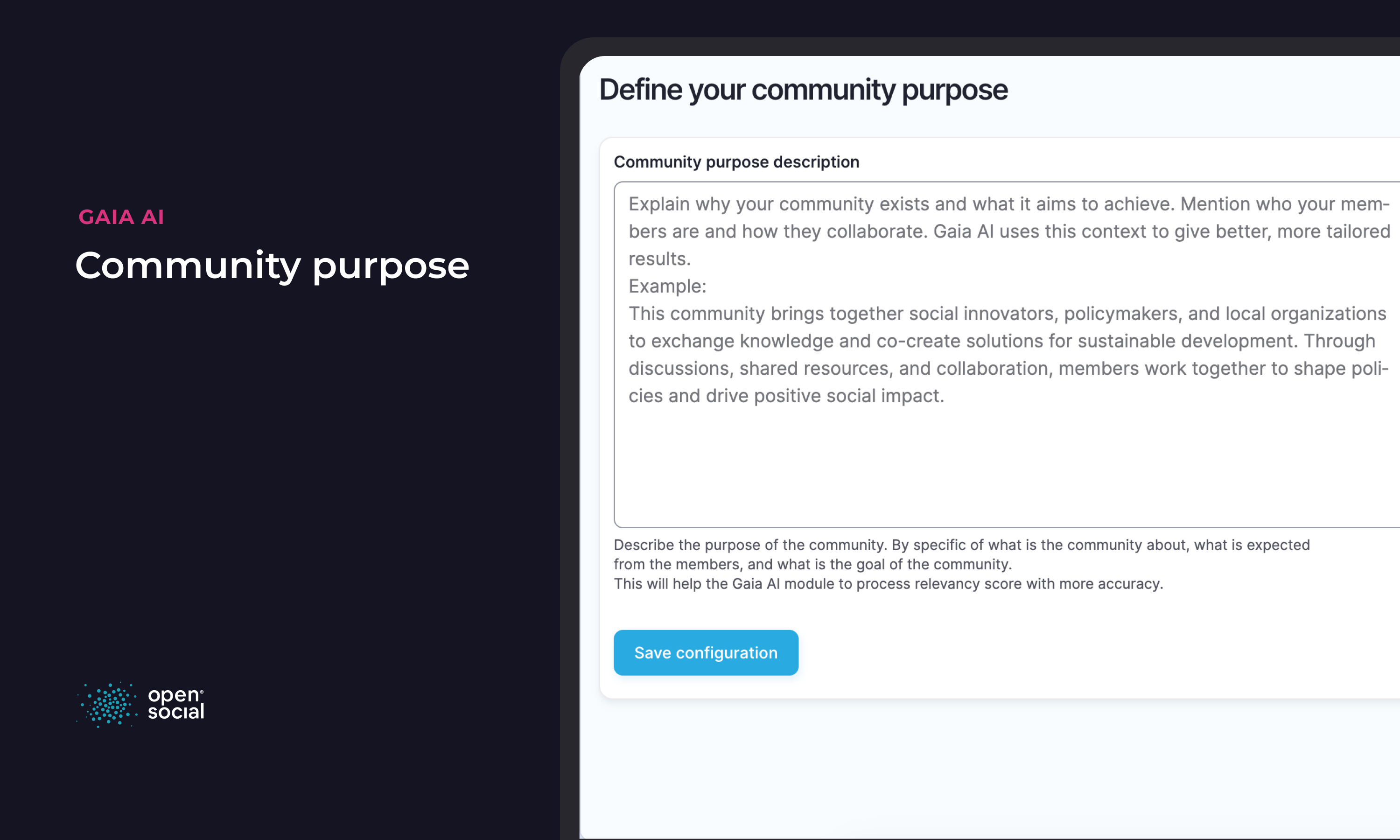
For the most accurate AI scoring, define your community's purpose under Gaia Settings → Community purpose definition. The AI uses this context when evaluating whether content is relevant or spam.
Tips
For most communities, we suggest this starting configuration:
- Define your Community purpose under Gaia Settings.
- Enable Unpublish Content at a trigger score of 40.
- Enable Extract Spam Words at a trigger score of 10 so the system learns over time.
- Add any known spam words manually in Spam Prevention Settings.
- Select the content types you want checked in Entity types.
- Monitor relevancy scores before enabling Block User.
This setup allows the AI to handle clear spam signals while giving your moderation team time to review results and adjust thresholds before enabling stronger actions.
← Previous: Gaia AI relevancy scoreBack to the Gaia AI manual